Component Lifecycle and State Management
Learning Outcome Guide
Section titled “Learning Outcome Guide”At the end of this class, you should be able to…
- Store and update internal state within a web component.
- Use getters and setters to interact with component properties dynamically.
- React to state changes and update the UI accordingly.
- Explain key lifecycle callbacks (connectedCallback, disconnectedCallback, attributeChangedCallback) and use them for initialization and cleanup.
Coding Demo
Section titled “Coding Demo”In-Class Demo Jan 2026 term
To run the coding demo, you need to have your Student Workbook open in Visual Studio Code.
-
Open the terminal window and paste in the following.
Run from the root of your repository pnpm dlx tiged --disable-cache --force DG-InClass/SDEV-1150-A04-Jan-2026/sk/lesson-23 ./src/lesson-23 -
Walk through the steps in the
ReadMe.mdof the new lesson.
Objectives
Section titled “Objectives”- Add a
userproperty to<user-card>that accepts a JavaScript object (name, avatar, id, description). - Use lifecycle methods (connectedCallback, disconnectedCallback, attributeChangedCallback) to initialize and clean up component behaviour.
- Add an external listener to track total followed users.
Instructor Demo
Section titled “Instructor Demo”Ensure No Outside Access to Class Attributes
Section titled “Ensure No Outside Access to Class Attributes”Previously, we created some members of the UserCard class with a name that started with an underscore (). The intent was to communicate to other developers, “Don’t access this directly - leave it alone.” But all that was just an “honors system” approach - nothing actually prevented a developer from directly accessing those items from outside user-card.js.
Fortunately, JavaScript supports private class attributes. You can mark a class attribute as private by prefixing it with a # symbol. Let’s update the user-card to implement the _followed attribute as a private field. While we’re at it, let’s also clean up the other class members that were marked with a leading underscore: _btn, _onFollow, and _setFollow.
class UserCard extends HTMLElement {  #followed = false;
  constructor() {    super();
    // Added property to track follow state    this._followed = false;    this.#followed = false;
    const shadow = this.attachShadow({ mode: 'open' });    const content = template.content.cloneNode(true);    const img = content.querySelector('img');    img.src = this.getAttribute('avatar') || 'https://placehold.co/80x80/0077ff/ffffff';    this._btn = content.querySelector('button');    this.#btn = content.querySelector('button');    this._btn.addEventListener('click', () => this._onFollow());    this.#btn.addEventListener('click', () => this.#onFollow());    shadow.appendChild(content);  }
  follow() {    this._setFollow(true);    this.#setFollow(true);  }
  unfollow() {    this._setFollow(false);    this.#setFollow(false);  }
  // Property to read followed state  get followed() {    return this._followed;    return this.#followed;  }
  _setFollow(value) {  #setFollow(value) {    this._followed = value;    this.#followed = value;    this._btn.textContent = this._followed ? 'Following' : 'Follow';    this.#btn.textContent = this.#followed ? 'Following' : 'Follow';    this.dispatchEvent(new CustomEvent('follow-change', {      detail: { id: this.getAttribute('user-id') || null, followed: this._followed },      detail: { id: this.getAttribute('user-id') || null, followed: this.#followed },      bubbles: true,      composed: true,    }));  }
  // Follow button handler  _onFollow() {  #onFollow() {    this._setFollow(!this._followed);    this.#setFollow(!this.#followed);  }
  // Respond to attribute changes if needed in the future  static get observedAttributes() {    return ['avatar'];  }
  attributeChangedCallback(name, oldValue, newValue) {    if (name === 'avatar' && this.shadowRoot) {      const img = this.shadowRoot.querySelector('img');      if (img) {        img.src = newValue;      }    }  }}
Using this approach, our UserCard instances will only have the following public members for us to interact with:
// Sample throw-away codelet myCard = document.createElement('user-card');console.log('Are we following?', myCard.followed); // access the propertymyCard.follow(); // call a methodconsole.log('We should be following now:', myCard.followed);myCard.unFollow();console.log('No longer following:', myCard.followed);// ... end of throw-away codeAny attempt to write code to access the private members will just crash the app.
// This line will crash EVERYTHINGlet myCard = document.createElement('user-card');console.log('Are we following?', myCard.followed); // access the propertyconsole.log('Attempting to access private member:', myCard.#followed); // 💥 CRASH!// Delete all this after experimentingAdd user Property and Lifecycle Usage
Section titled “Add user Property and Lifecycle Usage”User information on our <user-card> has been set through named slots. While that is convenient, it’s not necessarily the best way if we want to enforce some strict constraints on the content. For example, we intend our card to have just strings (text) as the user’s name and description. But nothing is stopping us from putting in other content.
<main> <user-card> <span slot="name">Someone <input type="checkbox" /></span> <span slot="description"> I am <ul> <li>Arbitrary</li> <li><del>Controlled</del></li> </ul> </span> </user-card> </main>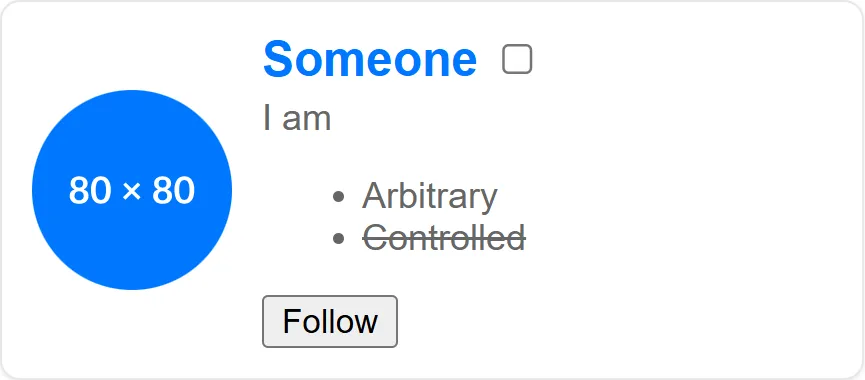
One way to address this is to set individual attributes for the name and description, just like we have for the avatar image URL. We could complement this approach by also adding private objects for each value for when we programmatically interact with.
In user-card.js, we’ll expose a user property (setter/getter), use connectedCallback to wire event listeners, and disconnectedCallback to remove them.
// Existing code...
class UserCard extends HTMLElement {  #followed = false;  #user = null;
  constructor() {    super();    this.#followed = false;    this.#user = null;    // Bind the button handler to the custom element    this._onButtonClick = this._onButtonClick.bind(this);
    const shadow = this.attachShadow({ mode: 'open' });    const content = template.content.cloneNode(true);    // Keep the img src blank here — it will be set from property/attribute    this._img = content.querySelector('img');    this._btn = content.querySelector('button');    shadow.appendChild(content);  }
  _renderFromUser() {    if (this.#user) {      // Update image and fallback attributes      if (this.#user.avatar) {        this._img.src = this.#user.avatar;      } else {        this._img.src = 'https://placehold.co/80x80/0077ff/ffffff';      }
      this.setAttribute('user-id', this.#user.id || '');      // Update internal slots via shadow DOM query selectors for text nodes.      // We want to avoid manipulating light DOM directly since we are provided with a user property.      const nameSlot = this.shadowRoot.querySelector('[name="name"]');      if (nameSlot) {        nameSlot.textContent = this.#user.name || '';      }
      const descSlot = this.shadowRoot.querySelector('[name="description"]');      if (descSlot) {        descSlot.textContent = this.#user.description || '';      }    }  }
  // Create a user property { id, name, avatar, description }  set user(obj) {    // TODO: Perform some data validation on the obj param here    this.#user = obj;    // Render the UI (assume user has changed)    this._renderFromUser();  }
  get user() {    return this.#user;  }
  _onButtonClick() {    this._setFollow(!this.#followed);  }
  // Lifecycle: called when element is added to DOM  connectedCallback() {    // Attach local listener(s)    this._btn.addEventListener('click', this._onButtonClick);
    // If user property was set before connection, render it now    if (this.#user) {      this._renderFromUser();    } else {      // Fallback to attributes if user property not provided      const avatar = this.getAttribute('avatar');      if (avatar) {        this._img.src = avatar;      } else {        this._img.src = 'https://placehold.co/80x80/0077ff/ffffff';      }    }  }
  disconnectedCallback() {    // Cleanup listener    this._btn.removeEventListener('click', this._onButtonClick);  }
  // Existing code ...
Programmatic Usage and External Listener
Section titled “Programmatic Usage and External Listener”import './user-card.js';
// Create an array of user objectsconst users = [ { id: 'u1', name: 'Zelda', avatar: 'assets/zelda-avatar.png', description: 'Princess of Hyrule' }, { id: 'u2', name: 'Link', avatar: 'assets/link-avatar.png', description: 'Hero of Hyrule' }, { id: 'u3', name: 'Mipha', description: 'Zora Champion' },];
// Render user cardsconst main = document.querySelector('main');users.forEach(user => { const card = document.createElement('user-card'); // Set property will cause a render card.user = user; // Add the card to the page main.appendChild(card);});
// External counter to track number of followed userslet followedCount = 0;
// Listen on the container (event bubbles out of shadow)main.addEventListener('follow-change', (e) => { // Add one or subtract one based on follow state followedCount += e.detail.followed ? 1 : -1; // Or, use Array filter for accurate count // followedCount = Array.from(document.querySelectorAll('user-card')).filter(c => c.followed).length; const counterEl = document.querySelector('#follow-counter'); counterEl.textContent = `Followed: ${followedCount}`; console.log('follow-change:', e.detail);});
// Call follow() programmatically on first cardconst first = document.querySelector('user-card');if (first) { first.follow();}// Or use optional chaining operator//document.querySelector('user-card')?.follow();Important Points
Section titled “Important Points”- Prefer setting rich data via properties (
card.user = {...}) instead of HTML attributes when passing objects. - connectedCallback is the proper place to attach DOM listeners and perform initial render tasks that depend on being in the document.
- disconnectedCallback must remove listeners to avoid leaks.
- Dispatch events with bubbles: true and composed: true so external code can listen across the shadow boundary.
- Use getters/setters to keep property and DOM in sync.
Student Exercise
Section titled “Student Exercise”- Add validation in the
usersetter to ensure required fields exist (e.g., id, name). - Persist followed state to
localStorageso follow state survives reload. - Emit a separate event when avatar image is clicked (e.g.,
open-profile).
Stretch Exercise
Section titled “Stretch Exercise”Replace the current theme toggle button implementation with a custom web component.
Common Errors & Fixes
Section titled “Common Errors & Fixes”| Issue | Cause | Fix |
|---|---|---|
| Slotted text not updated | Updating internal DOM instead of light DOM slot content | Update light DOM children (the elements with slot attributes) or render text inside the shadow DOM instead of relying on slots |
| Event listener not fired in app | Event not bubbled/composed | Dispatch with { bubbles: true, composed: true } |
| Property set before connectedCallback | Rendering relied on DOM connections | Ensure setter stores data and connectedCallback triggers render when element attaches |
Push changes
Section titled “Push changes”git add .- Commit the changes:
git commit -m 'Lesson 23 Example'- Push your changes to the remote workbook repository:
git push origin main